Read DEM
Category: Mega-Polis → Gathering → Gathering Design Tools
Node ID:SvMegapolisReadDem
Tooltip: Read a Digital Elevation Model file (GeoTIFF)
Dependencies: rasterio, numpy
Functionality
Reads a Digital Elevation Model (DEM) raster file (GeoTIFF) using rasterio, converts it into a structured 3D grid of vertices, and generates a face topology representing the terrain surface.
The node: - Loads the raster band as elevation data - Extracts geographic coordinates using the raster transform - Builds XYZ vertices where: - X = longitude - Y = latitude - Z = elevation value - Generates quad faces forming a regular terrain mesh - Outputs both the mesh representation and the raw elevation matrix
This allows DEM data to be directly used for terrain modelling, analysis, and visualization inside Sverchok.
Inputs
| Socket | Type | Description |
|---|---|---|
| Path | SvFilePathSocket | Path to a DEM GeoTIFF file (.tif/.tiff) |
Parameters
This node has no exposed UI parameters.
All behavior is derived directly from the raster file properties.
Outputs
| Socket | Type | Description |
|---|---|---|
| Vertices | SvVerticesSocket | Flattened list of 3D terrain vertices (lon, lat, elevation) |
| Faces | SvStringsSocket | Quad face indices forming a grid mesh over the DEM |
| DEM data | SvStringsSocket | Raw elevation matrix as a NumPy array (band values) |
How it works (internal logic)
- The DEM is opened using
rasterio.open(path). - Band 1 is read as the elevation array.
- Raster width/height define the grid resolution.
- A meshgrid is created to compute geographic coordinates.
- Coordinates are converted using
rio.transform.xy(...). - XYZ points are assembled:
- X = longitude
- Y = latitude
- Z = elevation
- Vertices are flattened into a single list.
- Quad faces are generated by indexing adjacent grid cells.
Example
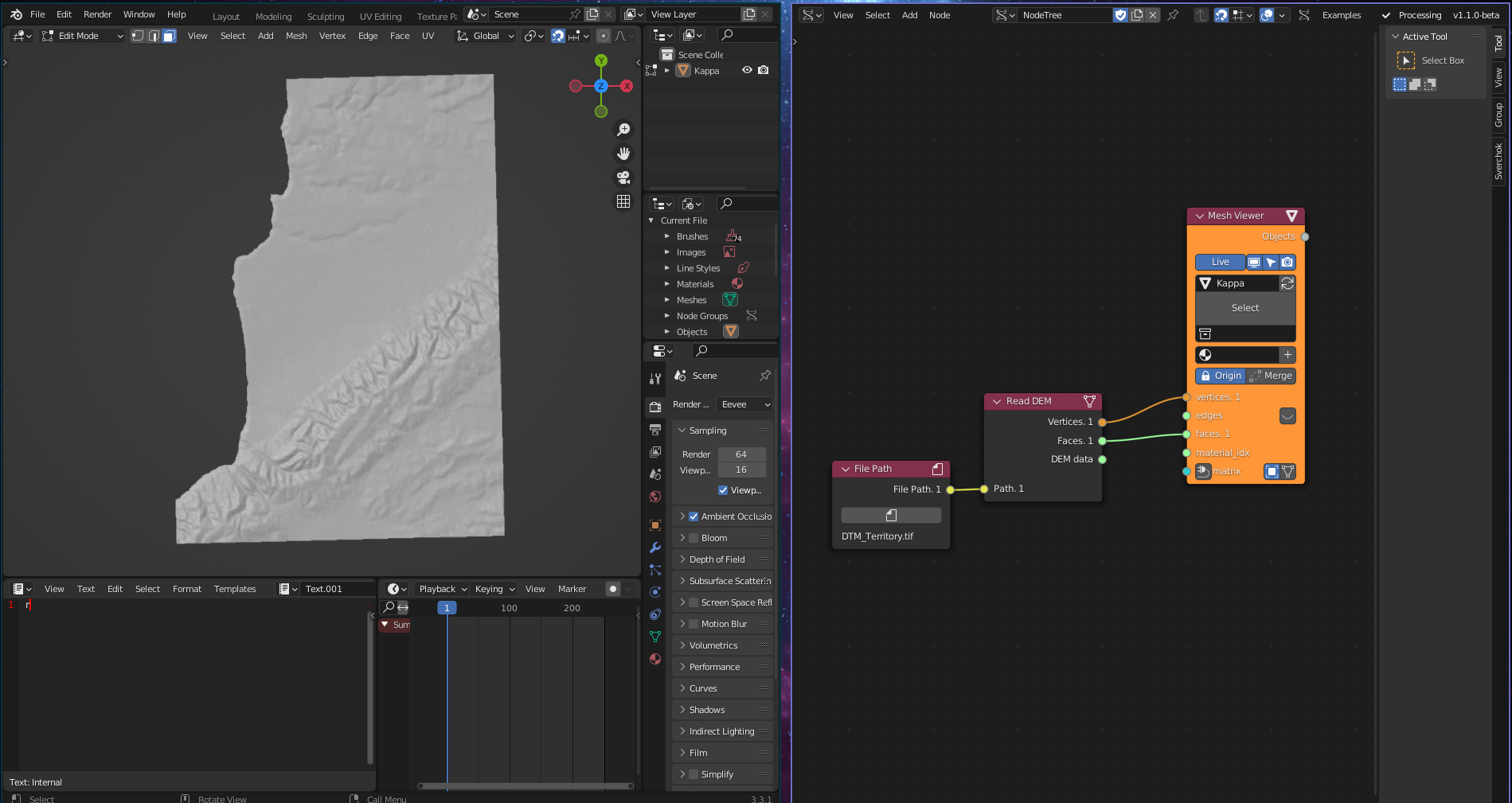
Terrain mesh from DEM
- Provide a
.tifDEM file path to the Path input. - Connect:
- Vertices → Viewer Draw / Mesh node
- Faces → Mesh construction
- The resulting mesh represents the terrain surface.
Data workflows
- Use Vertices to generate:
- Terrain meshes
- Height-based analysis
- Contour generation
- Use DEM data for:
- Raster analysis
- Slope or elevation calculations
- Data-driven simulations
Notes
- Vertex coordinates are geographic (longitude/latitude), not projected unless the DEM is already projected.
- Faces are generated as quads forming a regular grid surface.
- Output resolution depends entirely on the raster resolution.
- Large DEM files can generate very dense meshes and impact performance.