Download Street Imagery
Category: Mega-Polis → Gathering → Gathering Design Tools
Node ID:SvMegapolisDownloadStImagery
Tooltip: Download Geo-Referenced Mapillary Street Imagery
Dependencies:mapillary,requests,pyproj(Transformer),threading,os
Functionality
Downloads nearby Mapillary street-level images for a given geographic location and radius, saves the images as JPG files in a target folder, and outputs:
- The image IDs returned by the Mapillary query
- The (projected) coordinates for each downloaded image (from Mapillary
computed_geometry) - A message log of the downloaded files
Internally it:
- Queries Mapillary for images close to a given longitude/latitude within a radius
- Requests image metadata from the Mapillary Graph API (including
thumb_original_urlandcomputed_geometry) - Downloads images to
folder_name/<image_id>.jpg - Transforms the coordinates from lat/lon into the target EPSG projection using
pyproj.Transformer
Inputs
| Socket | Type | Description |
|---|---|---|
| Folder | SvStringsSocket | Output folder path (created if missing). Node does nothing unless this socket is linked. |
| Radius | SvStringsSocket | Search radius passed to Mapillary query. |
| Latitude | SvStringsSocket | Latitude of the query point. |
| Longitude | SvStringsSocket | Longitude of the query point. |
| Max_Num_Photos | SvStringsSocket | Maximum number of photos to download (slices the returned IDs list). |
Parameters
| Name | Type | Default | Description |
|---|---|---|---|
| download | Bool | False | When enabled, performs the query + downloads. If False, the node returns immediately. |
| projection | Int | 4236 | EPSG code used to transform coordinates via Transformer.from_crs("+proj=latlon", "epsg:<projection>"). |
Outputs
| Socket | Type | Description |
|---|---|---|
| Images_Index | SvStringsSocket | List of image IDs returned by Mapillary (note: outputs the full ID list, not only the sliced set). |
| Coordinates | SvVerticesSocket | List of 3D coordinates [x, y, 0] built from Mapillary computed_geometry.coordinates, transformed to the chosen EPSG projection. |
| Output_Message | SvStringsSocket | Download log messages (one per downloaded image). |
Example
Minimal workflow
- Add Download Street Imagery.
- Connect:
- Folder →
"/tmp/mapillary"(or any writable directory) - Longitude →
"144.9631" - Latitude →
"-37.8136" - Radius →
"50" - Max_Num_Photos →
"10"
- Folder →
- Enable download.
- Check the folder for files like:
<image_id>.jpg
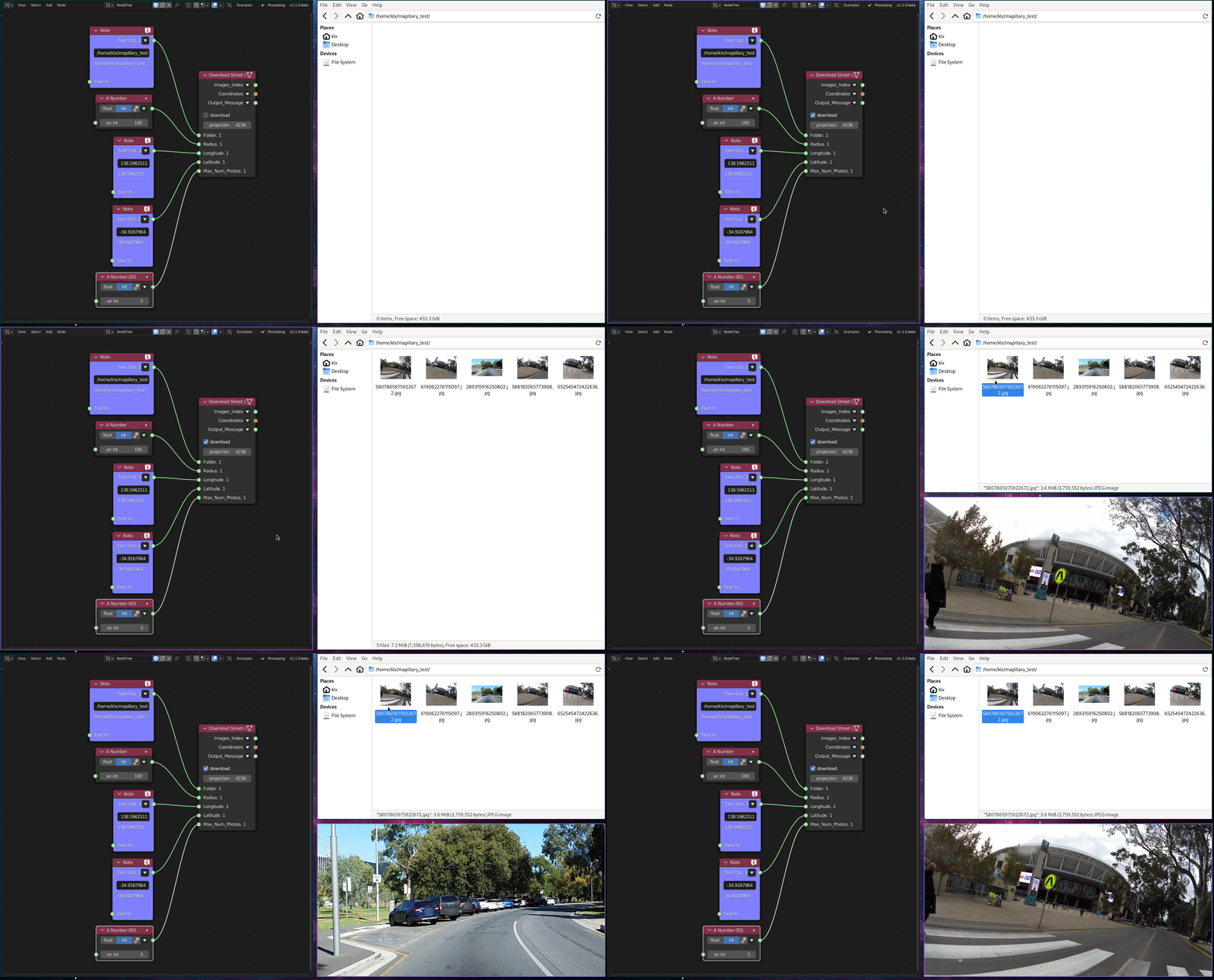
Use outputs: - Images_Index to keep track of which images were returned - Coordinates to place markers/points at image locations in your scene - Output_Message for confirmation/debugging