Load Street Network
Category: Mega-Polis → Gathering → Gathering Design Tools
Node ID:SvMegapolisLoadStreetNetwork
Tooltip: Load a street network from OpenStreetMap
Dependencies: osmnx, networkx, geopandas
Functionality
Loads a street network graph from OpenStreetMap using osmnx and converts it into a graph structure suitable for network-based analysis workflows.
The node retrieves a street network using a place name and network type (drive, walk, bike, etc.), then outputs the resulting NetworkX graph together with node and edge data structures that can be used by downstream Mega-Polis analysis nodes (e.g., shortest path, network analysis, centrality metrics).
This node acts as the primary bridge between OpenStreetMap and network-based spatial analysis pipelines.
Inputs
| Socket | Type | Description |
|---|---|---|
| Place | SvStringsSocket | Place name used to download the street network (e.g., “Melbourne, Australia”) |
Parameters
| Name | Type | Default | Description |
|---|---|---|---|
| network_type | Enum | drive | Type of network to retrieve from OpenStreetMap |
| simplify | Bool | True | Simplifies the graph topology (merges unnecessary nodes) |
| retain_all | Bool | False | If enabled, keeps disconnected components |
| truncate_by_edge | Bool | False | If enabled, truncates edges at boundary limits |
Available network types
- drive
- walk
- bike
- all
- all_private
These correspond to standard osmnx network filters.
Outputs
| Socket | Type | Description |
|---|---|---|
| Graph | SvStringsSocket | NetworkX graph object representing the street network |
| Nodes | SvStringsSocket | Node table extracted from the graph |
| Edges | SvStringsSocket | Edge table extracted from the graph |
How it works
Uses osmnx to request a street network from OpenStreetMap:
ox.graph_from_place(place, network_type=network_type, simplify=simplify, retain_all=retain_all, truncate_by_edge=truncate_by_edge)Converts the result into:
- A NetworkX graph
- Node data (coordinates, attributes)
- Edge data (length, type, connectivity)
Outputs the graph and associated tables for downstream network analysis nodes.
Example
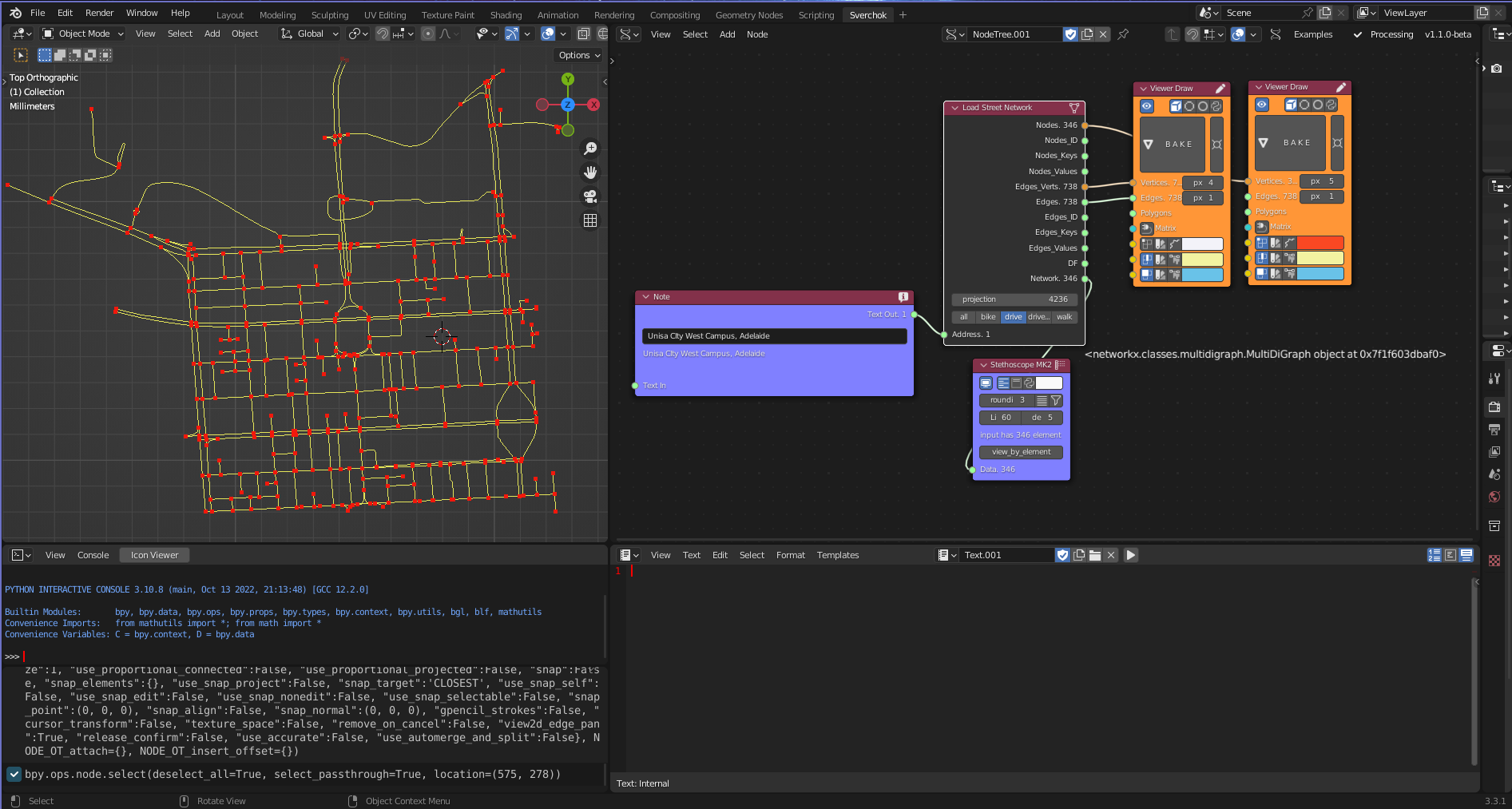
Basic workflow
- Add Load Street Network node.
- Connect:
- Place → “Melbourne, Australia”
- Set:
- network_type → walk (for pedestrian network)
- Use outputs:
- Graph → Network analysis nodes
- Nodes → spatial analysis / point workflows
- Edges → geometry-based processing
Typical uses
- Feed Graph into:
- Shortest Path
- Network centrality analysis
- Accessibility analysis
- Use Nodes/Edges for:
- Spatial visualisation
- Attribute filtering
- Graph-to-geometry conversion
Notes
- Data is downloaded live from OpenStreetMap.
- Output graph is compatible with NetworkX-based workflows.
- Pedestrian networks typically produce denser graphs than drive networks.
- Large cities can produce heavy graphs; consider testing with smaller places first.